 Project Timeline
← Back to the app
Project Timeline
← Back to the app
Software release timeline template
Free · opens in your browser · no sign-up
Last updated
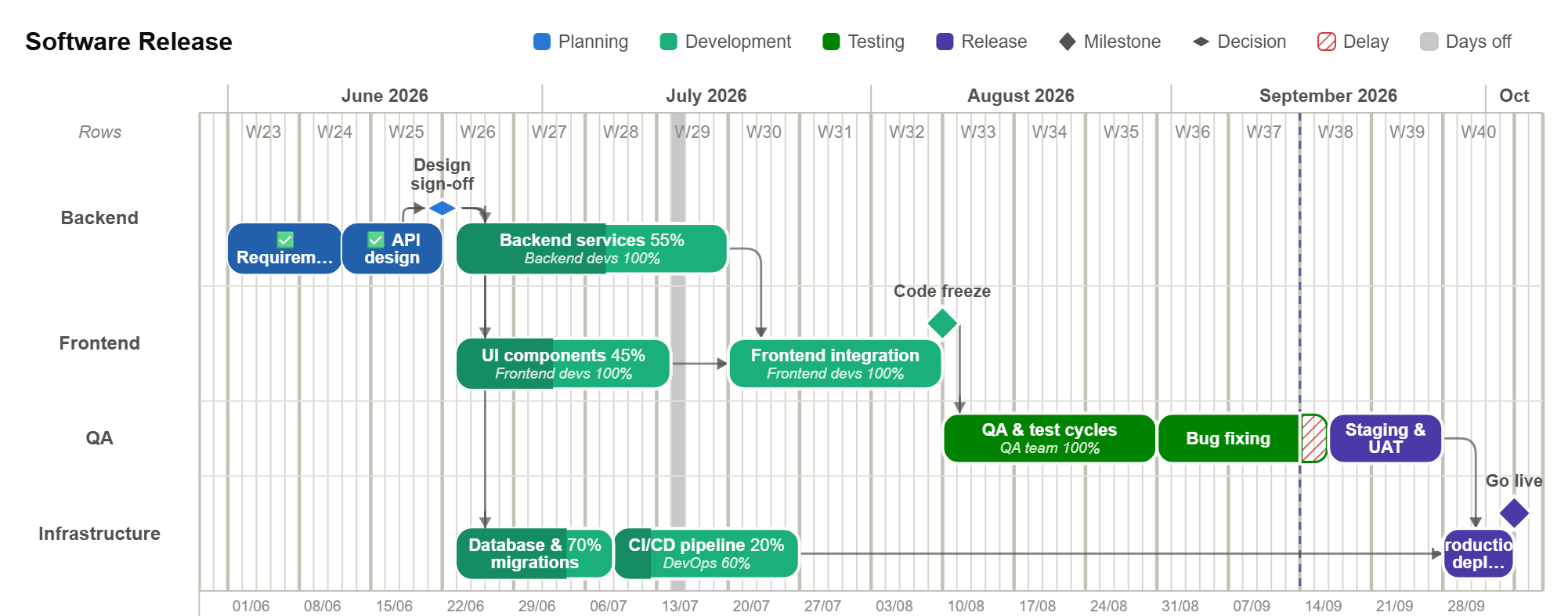
A release plan across backend, frontend, QA and infrastructure. Test cycles depend on the build finishing, and the release milestone depends on QA signing off — so a slip in development shows up on the release date immediately.
✨ Reshape it by asking
A template gets you a structure; it will not be your structure. Rather than drag every bar into place, tell the built-in AI what is different and let it rework the schedule — it edits the real plan, so dependencies recalculate and everything downstream moves with them.
- Add a security review before release
- Compress testing to one week and tell me what slips
- Add a second QA engineer from week three
The assistant needs a free account, and answers 2 requests a day on the free plan or 50 on Pro. Every change it makes is one undo away.
What is in it
Four stages across 4 rows, with 4 resources assigned and every dependency already drawn. Nothing is a picture — every bar, link and milestone is editable.
Stages
- 1Planning
- 2Development
- 3Testing
- 4Release
Rows
- Backend
- Frontend
- QA
- Infrastructure
Resources
- Backend devs
- Frontend devs
- QA team
- DevOps
Who it suits
Built for engineering teams planning a versioned release rather than a continuous flow. If it is close but not exact, change it — renaming a row or dragging a bar takes a second, and the dates downstream follow on their own.
How to make it yours
The button above loads the plan straight into the editor. It replaces whatever is open, so it will ask first if you already have work.
Click any row or resource name and type over it. The chart is the editor — there is no separate form to fill in.
Drag the bars, or use Shift start to… to move the whole plan to the date you actually start.
SVG, PNG or PDF, sized for a slide. The export is vector, so it stays sharp when someone zooms in.
More templates
Website launch, Product development, Event planning, Hardware development — or start from all five templates.