 Project Timeline
← Back to the app
Project Timeline
← Back to the app
A lighter alternative to Microsoft Project
Free · opens in your browser · no sign-up
Last updated
Microsoft Project is built for people who schedule for a living. Most people reaching for it want a chart others can read — and end up paying for, and learning, a great deal they never use.
What carries over
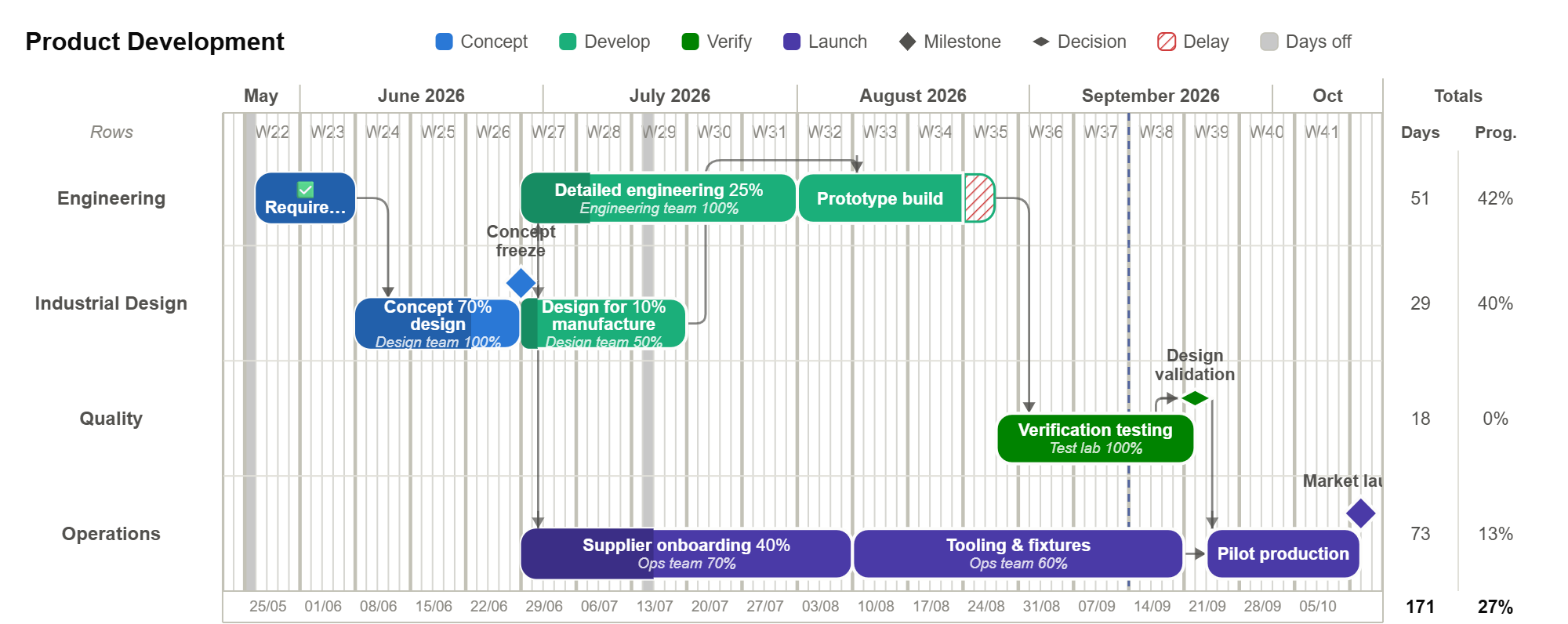
The parts most people actually use are here: tasks and milestones on a timeline, finish-to-start dependencies with lag, a calculated critical path, working calendars with public holidays, resources with allocation and over-allocation warnings, day rates and cost totals, and a baseline to compare against.
It opens in a browser, so there is nothing to install and nothing to license per seat. A plan can be sent as a read-only link that needs no account at the other end.
What does not, and should be said plainly
This is not a replacement for a full scheduling suite, and it is worth knowing before you move:
- No automatic resource levelling — over-allocation is flagged, and you resolve it yourself.
- Only finish-to-start links. No start-to-start, finish-to-finish or start-to-finish.
- One baseline per project rather than a set of numbered ones.
- No .mpp import or export. CSV is the way in and out.
- No earned value, no resource pools across a portfolio, no timesheets.
If your work depends on any of those, stay where you are — that is a real answer, not a hedge.
Where it is genuinely better
Editing happens on the chart. There is no grid to keep in step with a picture of itself, which removes most of the friction people describe when they say they find Project heavy.
Export is vector, so the chart lands on a slide sharp rather than as a screenshot. And the whole thing is one page in a browser, so handing it to someone means sending a link, not asking whether they have a licence.
Moving a plan across
Export your tasks from Project as CSV, then import that file here. Dates, names and durations come across; dependencies need redrawing, which is usually quicker than it sounds because you are also deciding which of them were ever real.